Quick start
Heimdall runs wherever Node.js 20.19+ runs — macOS, Linux and Windows. Only one feature is macOS-specific: keeping the .p8 key in the macOS Keychain. On Linux and Windows you supply the key as a file path or inline PEM; everything else is identical.
Create an API key
Go to App Store Connect Users and Access → Integrations → Keys, generate a key, and download the .p8 file. Note the Key ID and Issuer ID from the same page.
If you will also ask about customers — purchase history, entitlement, refunds (StoreKit 2) — have your app's Bundle ID ready too. The wizard asks for it when you pick the monetization profile; skip that profile and it never asks.
Keep it somewhere safe until you've run setup.
The role you give the key decides which permissions an agent gets — and what it can break if a prompt goes wrong. Pick the narrowest role that covers your use case; what each role opens is in Roles and permissions.
Install
Get ready for an MCP install you have not seen before.
Open a terminal.
npx -y @erayendes/asc-mcp setup

Store credentials once — the setup wizard
The wizard asks for what it needs to reach your App Store Connect account.
Key IDandIssuer IDformats are checked as you type.- The
.p8path accepts a drag-and-drop from Finder and re-prompts until it points at a real key file. - It verifies the credentials against Apple before saving. If Apple rejects them, you re-enter.
- An optional
Vendor numberis asked for, needed only for sales and finance reports. - The client picker asks which MCP clients should carry the profiles, with everything found on this machine already checked. Client configs are backed up first, then edited.
- Each row of the profile picker shows the profile's tool count and rough token cost; already-registered profiles are pre-checked. Which to choose is in Profiles.
- If you pick the
monetizationprofile, it asks for the Bundle ID and the StoreKit environment (Sandbox/Production). Skip monetization and you're never asked.
At the end it shows the plan, asks once, and registers everywhere you chose. When it finishes, restart your client and say "check the App Store Connect connection" — that calls asc__status, which validates your credentials.
- The key is stored in the macOS Keychain. Off macOS it is referenced by file path.
- Everything non-secret goes to
~/.config/asc-mcp/config.json. Every profile reads this shared config.- If Heimdall's setup has run before, it finds your saved
Key/Issuerand offers to reuse them and just re-pick profiles.- Xcode 27 installs plug-ins from a Git URL, so there is no config file — which is why it has no place in the setup wizard.
Is an AI agent installing Heimdall for you?
The handoff protocol is in AGENTS.md: the agent adds the profiles with register, you run setup yourself for the key — your private key is for your eyes only, and the agent never sees it.
Where it registers
setup registers the profiles with every MCP client it finds. None of these clients share a config file, so this is the step that would otherwise be done once per client, by hand, in a different format each time.
| Client | Where it goes | Written by |
|---|---|---|
| Claude Code | ~/.claude.json | claude mcp add |
| Claude Desktop | ~/Library/Application Support/Claude/claude_desktop_config.json | edited here |
| Codex | ~/.codex/config.toml | codex mcp add |
| Antigravity | ~/.gemini/config/mcp_config.json | edited here |
| Cursor | ~/.cursor/mcp.json | edited here |
| Windsurf | ~/.codeium/windsurf/mcp_config.json | edited here |
| VS Code | user MCP config | code --add-mcp |
Adding and removing later
Start with a couple of profiles and add more when a project needs them.
- Re-run setup —
npx -y @erayendes/asc-mcp setup. - It reuses your credentials and shows the pickers again.
- Clients and profiles come pre-checked as they stand. Check or uncheck; it registers and de-registers across every client you selected.
Reaching a tool without restarting
A profile you narrowed still knows about the rest of itself:
asc__describereturns the full schema of any tool the profile owns — loaded or not.asc__callonly reads. It lists prices and fetches apps, but never changes a price or submits a version.asc__loadadds a whole sub-profile mid-session and makes its tools callable.
And if the tool is in another profile entirely? asc__search_tools searches all 982 operations plus StoreKit, names the sibling server that owns anything not loaded, and prints the command to add it. Install lean and let the server tell you what you are missing.
Heimdall in Xcode 27
-
Run
npx -y @erayendes/asc-mcp setuponce, if you have not. Your key goes into the Keychain; the plug-in has no other way to reach it. -
Xcode → Settings → Intelligence → Plug-ins → Add Plug-in…
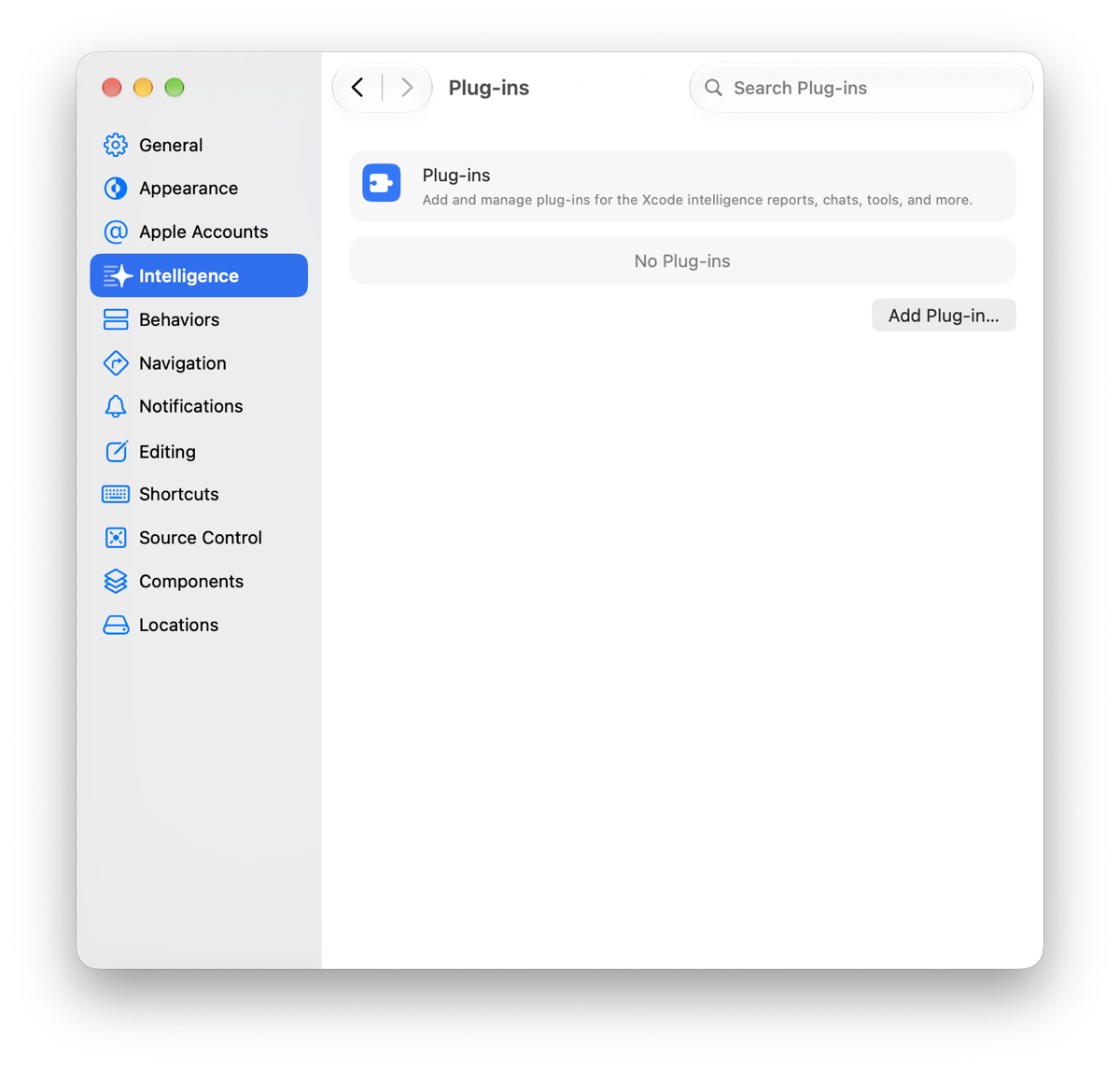
-
Choose Add from URL and paste
https://github.com/erayendes/app-store-connect-mcp.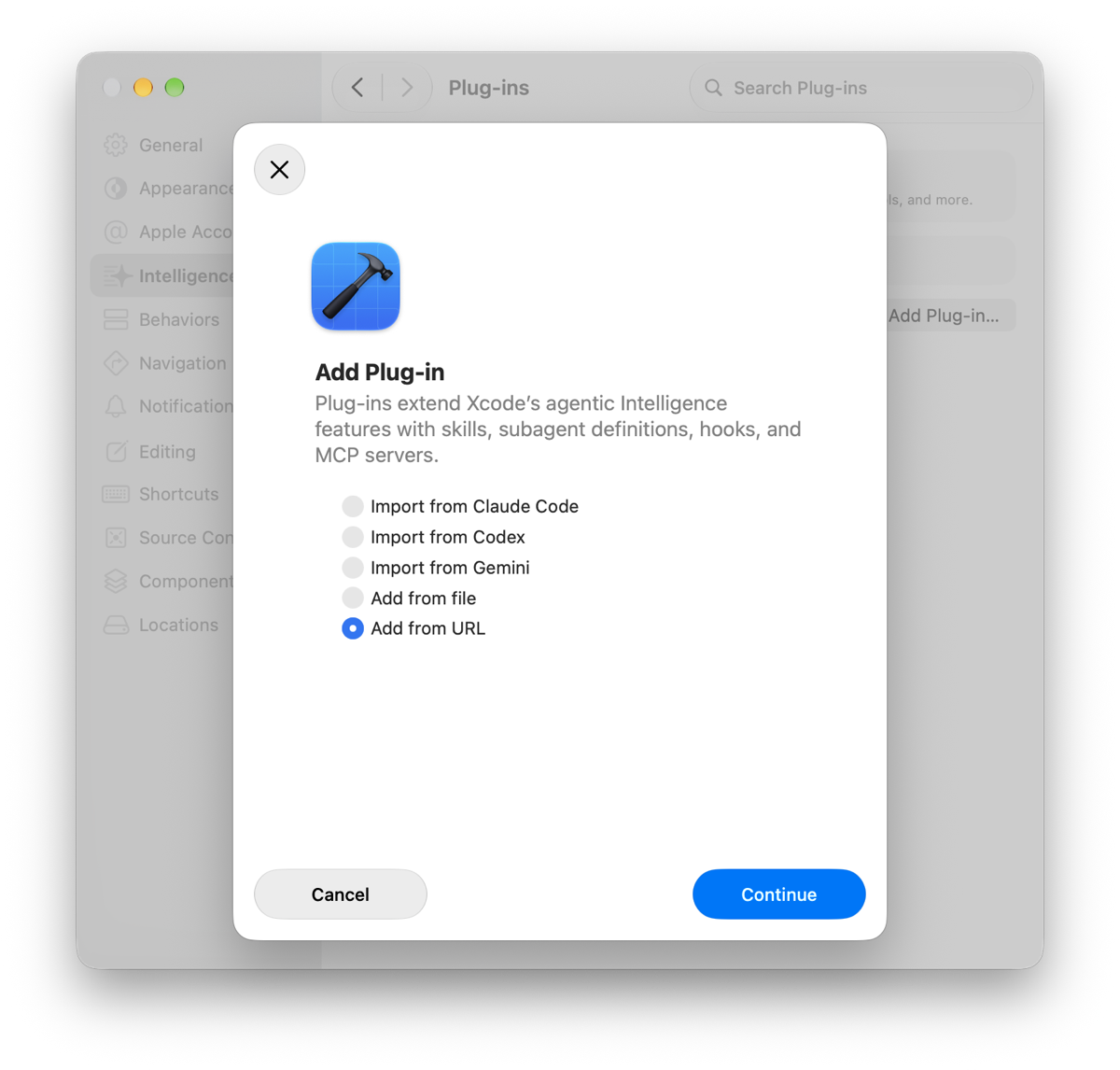
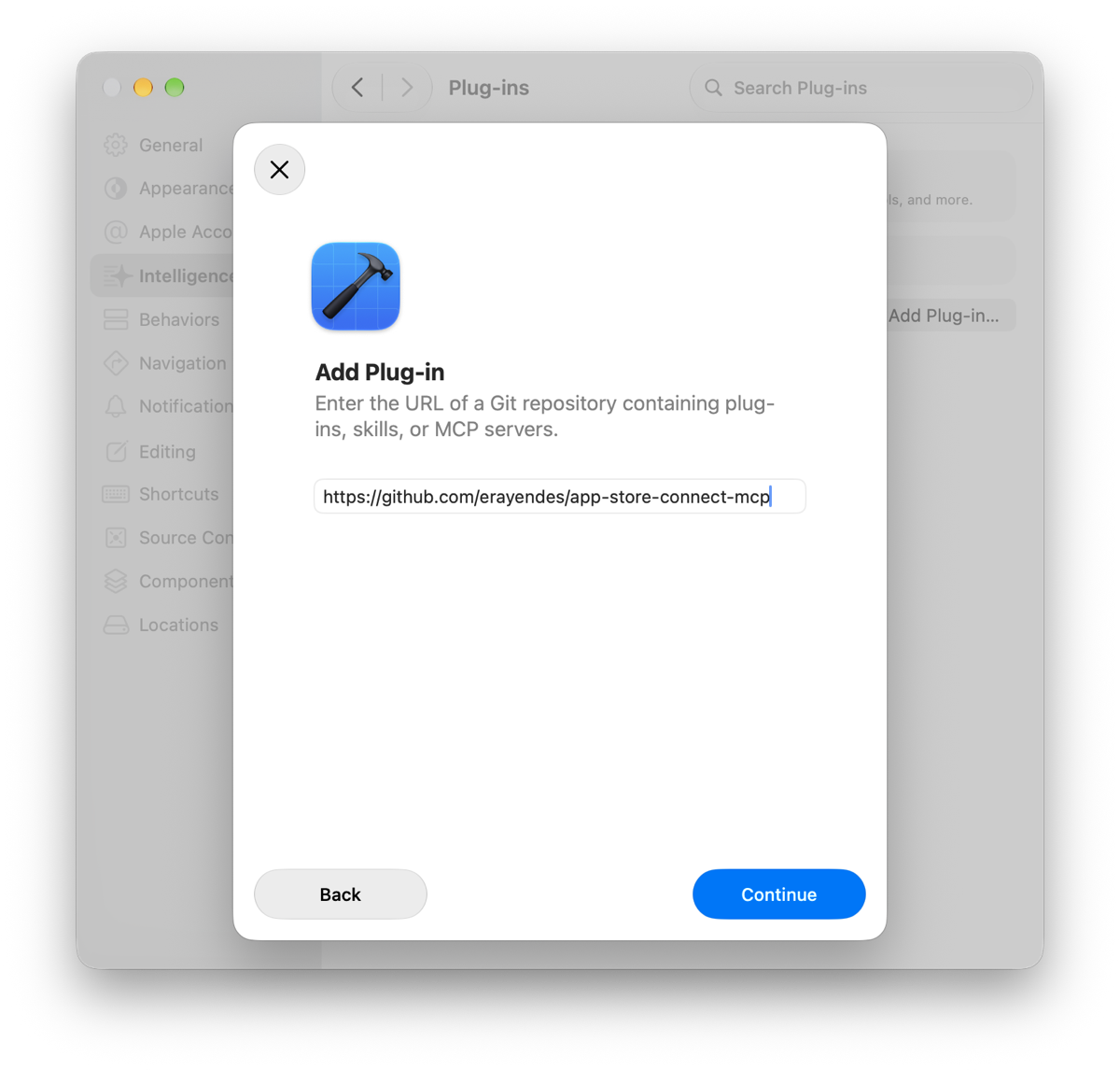
-
Xcode shows a "Choose Plug-ins" sheet with a checkbox per plug-in. Tick Heimdall | ASC Skill and the areas you need.
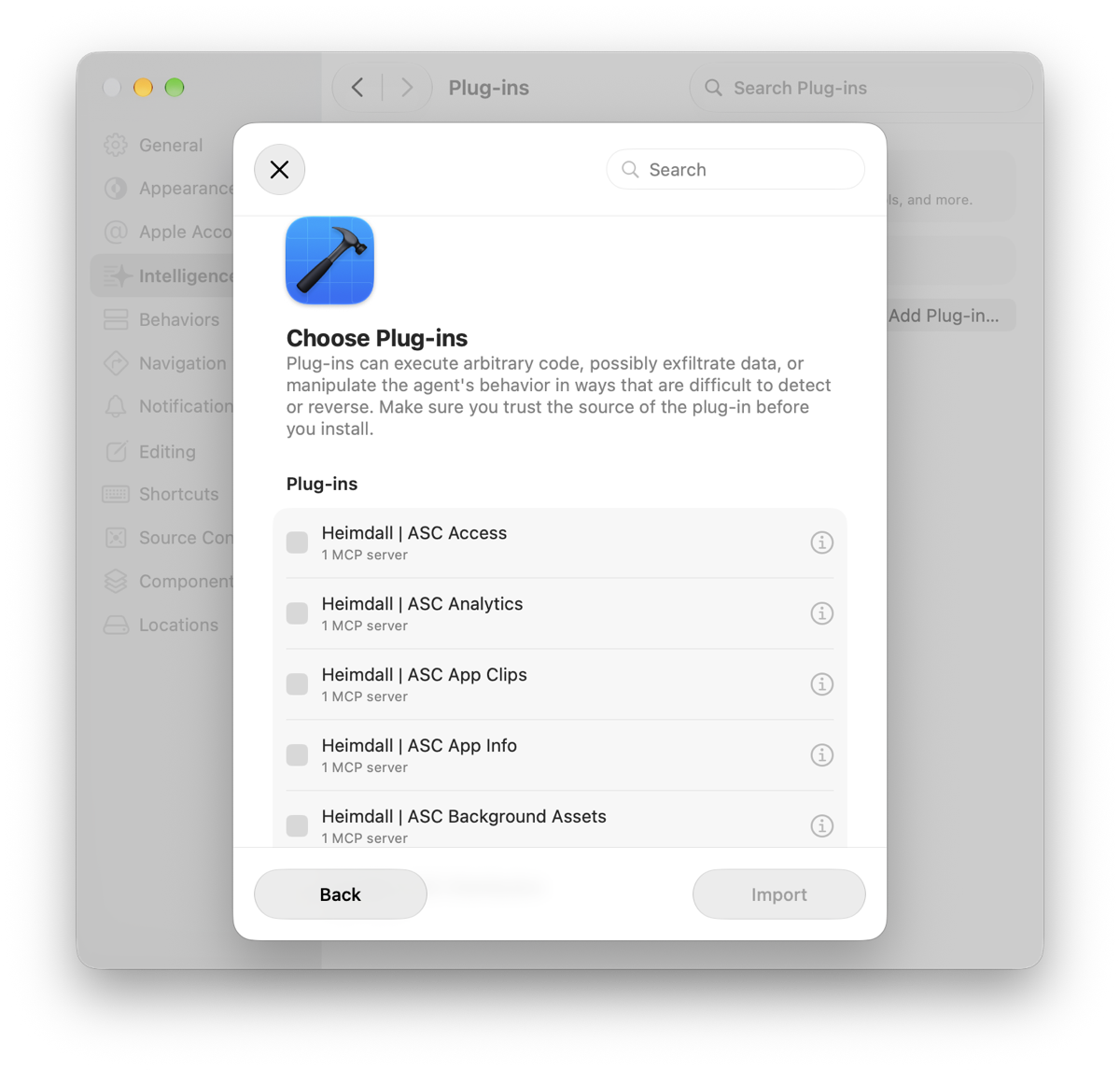
-
The first App Store Connect call asks for permission, the way any agent tool does.
From here on it is the Heimdall you know.
Add from URL again with the same address: the sheet greys out what is already in as "Already imported", so tick the new one and Import. To drop an area, open its plug-in from the list and Delete Plug-in.
Plug-ins go to the agents Xcode hosts, not to its built-in chat. Pick an agent from the conversation's model menu rather than a built-in model. The agent you pick launches the servers.
Troubleshooting
| Symptom | What's going on | Fix |
|---|---|---|
401 Unauthorized | Key ID, Issuer ID and .p8 don't all belong to the same key, or the key was revoked. | Re-run setup — it verifies the credentials against Apple before saving. |
403 Forbidden | The key's role lacks permission for that operation. | Roles and permissions. Call asc__status with check_capabilities: true to see what is closed. |
409 Conflict on a version update | App Store Connect only allows edits in certain version states. | A version in review or already released is locked. |
| Too many tools / context exhausted | You're running the combined server or --domains=all. | Register a single profile. asc__search_tools still finds what you need. |
| The tool I need isn't listed | It's in another profile. | Let the agent search: asc__search_tools names the sibling server and prints the command to add it. |
429 Too Many Requests | Requests are paced to Apple's 3,600/hour limit and retried with backoff. | Persistent 429s mean something else is using your key too. |
| StoreKit tools missing | The App Store Server API needs a Bundle ID. | Re-run setup and enter the Bundle ID under monetization. |
Uninstall
Unregister first. Re-run setup, uncheck everything in the profile picker, and it removes the profiles from every client you select.
Then the rest:
# The shared credential config
rm -rf ~/.config/asc-mcp

# The key in the macOS Keychain, if you used it
security delete-generic-password -s asc-mcp -a AuthKey_XXXXXXXXXX

# The package, only if you installed it globally
npm uninstall -g @erayendes/asc-mcp
Revoking the API key itself happens in App Store Connect. Deleting the local copy does not revoke it.